 November 17, 2026 |
Posted by: Amit Roy
The right Laravel tech stack is the smallest set of tools that meets your application’s traffic, security and team requirements. Laravel’s ecosystem is large, and most applications need only part of it. Adding tools you don’t need adds code to maintain, more things to monitor and more ways for a deployment to fail.
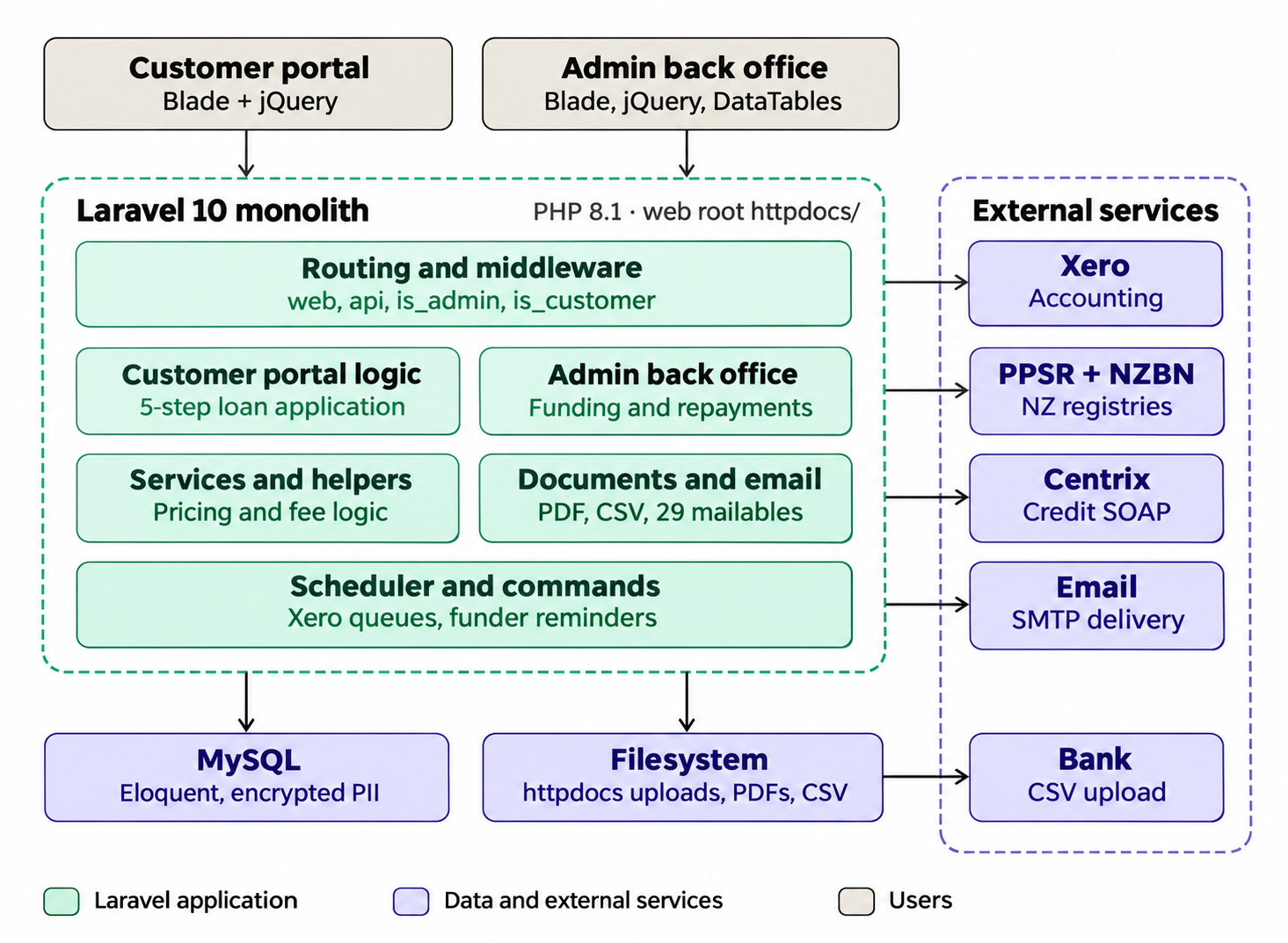
This guide explains how our team chooses between the common options at each layer of a Laravel application, with examples from projects we have delivered, including the lending platform we built for ChildCare Funders.
Our rule: start small, add tools when a requirement calls for them
Before we add any package, we ask three questions:
- Which specific requirement does this tool solve?
- Can Laravel’s core features solve it well enough?
- Who will maintain and monitor it after launch?
If we can’t answer the first question clearly, the tool waits until we can.
Frontend and admin panels: Laravel Livewire vs Inertia, Laravel Filament vs Nova
The first decision is how your users’ screens get built, and it mostly depends on your team’s skills.
| Tool | What it is | Choose it when |
| Livewire | Builds reactive forms, tables, modals and live search mainly in PHP and Blade. | Your team is PHP-first and you want interactive screens without a separate JavaScript front end. |
| Inertia.js | Connects Laravel to modern frontend frameworks like Vue, React or Svelte while keeping Laravel’s routing and controllers. | You want a single-page-app experience or have React or Vue developers, but don’t want to build a separate API. |
| Filament | Open-source admin panel and form/table builder around Eloquent ORM models, built on Livewire. | You need back-office dashboards and CRUD screens quickly. |
| Laravel Nova | Laravel’s official, paid administration panel. | You prefer a licensed, first-party admin product with official support. |
Livewire or Inertia? If the people maintaining the app write PHP every day, Livewire keeps everything in one language. If you already have front-end developers or plan a rich, app-like interface, Inertia lets them use the JavaScript framework they know. Livewire with Tailwind and Alpine.js is often called the TALL stack.
Laravel Filament vs Nova is a practical choice for admin panels: both handle typical back-office needs. Filament is free and highly customizable; Nova is a paid, first-party option. For most client projects we start with Filament unless the client already has Nova licenses.
The ChildCare Funders admin area is a dedicated back-office portal built around daily workflows. A persistent sidebar and tabbed modules cover loans, customers, reports, calculators, finders and funders. Admins handle repayments, direct debits and loan-status changes from the same place.
Authentication and access control: Laravel Sanctum vs Passport, plus Spatie Laravel Permission
This is where we see the most over-engineering. Many teams install a full OAuth2 server simply because the application has an API.
| Tool | What it is | Choose it when |
| Laravel Sanctum | Lightweight authentication for single-page apps, mobile apps and simple API tokens. | Your own front end or mobile app talks to your own API. This covers most applications. |
| Laravel Passport | A full OAuth2 server with scopes and grant types. | Third-party applications need to access your users’ data with their permission, for example partner integrations. |
| Spatie Laravel Permission | Defines roles and granular permissions and enforces them through Laravel’s authorization layer. | The application has several user types who should see and do different things. |
Sanctum vs Passport in one sentence: use Sanctum unless an outside application needs OAuth2 authorization, then use Passport.
Spatie Laravel Permission doesn’t replace either of them. Sanctum or Passport answers “who is this user?” on the backend; the permission layer answers “what is this user allowed to do?”.
Example from a lending platform. The ChildCare Funders portal we built has separate experiences for borrowers, lenders and administrators. Borrowers complete multi-step loan applications they can pause and resume, and upload documents. Administrators manage loan statuses, repayment schedules, funders and finders. ChildCare Funders uses Spatie Laravel Permission to control which loan data and actions each role can access. Each role needs a different view of the same loan data, which is exactly the problem a role-and-permission layer solves. When considering Laravel for fintech, keeping access rules in one place makes them easier to review and audit.
Background jobs and performance: queues, Redis, Horizon and Octane
Slow work should not happen while a user waits for a page to load. Moving it into background jobs is usually the biggest performance win in a Laravel application, and it costs far less than scaling servers.
| Tool | What it does | Choose it when |
| Laravel Queues | Runs slow tasks such as emails, PDFs, imports and external API calls outside the web request, with retries. | Almost every production application. |
| Redis | Fast storage for queues, caching, sessions and rate limiting. | You run queues at volume or need caching across several servers. |
| Laravel Horizon | Dashboard and configuration for Redis queues: throughput, failures, wait times and workers. | You use Redis queues and need to see what’s happening in them. |
| Laravel Octane | Keeps the application in memory between requests using servers such as Swoole, RoadRunner or FrankenPHP. | You have measured high traffic and request overhead is the bottleneck. |
Example from a lending platform. In a loan portal, payment callbacks, notifications, statement generation and syncing data to an accounting system such as Xero are all good candidates for queued jobs. If a payment provider or Xero is slow, the user’s screen still responds, and a failed job can retry instead of losing data.
When to use Laravel Octane
Only after profiling shows that the framework’s per-request start-up is the bottleneck. Octane can improve throughput, but because the application stays in memory, code that stores state in singletons or static properties can leak data between requests. That needs careful review, and in a financial application, a leak between users is a serious risk.
Hosting and deployment: Laravel Forge vs Vapor vs Docker
| Option | What it is | Choose it when |
| Laravel Forge | Provisions and manages servers on providers such as AWS and DigitalOcean, including deployments, SSL, queue workers, and scheduled tasks. | You want conventional servers with less setup work. This suits most business web applications. |
| Laravel Vapor | Deploys Laravel serverlessly on AWS Lambda, with automatic scaling. | Traffic is spiky or unpredictable, and your team is comfortable with AWS. |
| Docker / Laravel Sail | Packages the application and its dependencies. Sail is Laravel’s official Docker setup for local development. | You want the same environment in development, staging and production, or your company already runs containers. |
| CI/CD pipeline | Automates tests, quality checks, builds and deployments. | Every project. |
Laravel Forge vs Vapor: Steady traffic and a predictable monthly bill point to Forge. Large, sudden spikes, such as a campaign launch or end-of-month processing, can justify Vapor’s serverless model.
Testing: Pest vs PHPUnit
| Tool | What it is | Choose it when |
| PHPUnit | The standard PHP testing framework and the foundation of Laravel’s testing tools. | Your team or client already has PHPUnit test suites. |
| Pest | A more readable testing syntax built on PHPUnit, with built-in architecture tests. | You’re starting a new project and want tests that are quicker to write and read. |
Both support parallel test runs with <code>php artisan test –parallel</code>, and existing PHPUnit tests also run under Pest, so you can switch gradually. The choice matters less than running tests automatically before every release. For lending and payment features, we prioritize tests around calculations, repayment schedules and permissions, where a bug affects money or data access.
Laravel tech stack decision checklist
| If you need… | Start with | Move to |
| Interactive screens, PHP team | Livewire | Inertia if you add React or Vue developers |
| Admin dashboards | Filament | Nova if you prefer a licensed first-party product |
| Login for your own web or mobile app | Sanctum | Passport only when third parties need OAuth2 |
| Several user roles | Spatie Laravel Permission | Custom policies for complex rules |
| Emails, PDFs, imports, payment callbacks | Laravel Queues | Redis and Horizon as volume grows |
| More throughput | Queues and caching | Octane after profiling |
| Hosting | Forge | Vapor for spiky traffic |
| Testing | Pest or PHPUnit | Add architecture tests as the codebase grows |
Frequently asked questions
What is the best Laravel tech stack?
There isn’t one Laravel development tech stack for every project. A typical starting point is Laravel with Livewire or Inertia for the front end, Sanctum for authentication, database or Redis queues for background work, Forge for hosting and Pest or PHPUnit for tests. Add tools such as Passport, Octane or Vapor only when a requirement calls for them.
Should I use Laravel Sanctum or Passport?
Use Sanctum for your own single-page app, mobile app or simple API tokens. Use Passport when you need a full OAuth2 server so third-party applications can access your users’ data.
Is Laravel Livewire or Inertia better?
Neither is better in general. Livewire suits PHP-focused teams, and Inertia suits teams that want to build the interface in Vue, React or Svelte.
Is Laravel good for fintech applications?
Yes. Laravel for fintech projects provides robust security features like authentication, authorization, queues, encryption, and testing out of the box, covering much of what lending and payment platforms need. Compliance requirements such as audit trails, data protection and secure document handling still need to be designed into the application. We built the ChildCare Funders lending platform on Laravel, with multi-step loan applications, repayment scheduling, Xero integration and AML and loan statement reports.
Need Laravel developers who make these decisions for you?
Our developers choose tools around your requirements, not the other way round. If you’re planning a new Laravel application or need to extend an existing one, you can hire Laravel developers from Mejora Infotech on an hourly, part-time, or full-time basis.
